Delta keeps asking for a key because the executor is locked. The key works like an access pass that tells Delta you are a real player. Most players use Loot Link because it is the official method that works every time and does not require risky shortcuts or random sites.
You do not need tricks or hacks. You only need to follow the steps shown in the app. The key system exists to protect the executor from fake users and spam tools. Because the keys are unique, each player must complete the process once before unlocking scripts.
This guide will show how to claim your key, paste it into Delta, and unlock scripts. You’ll also learn how long keys last and how to avoid common mistakes. The process usually takes only a few minutes.
What is Loot Link and Why Does Delta Use It?
Loot Link is the system Delta uses to deliver your key. It checks that you are a real player before unlocking the executor. When you tap Get Key in the app, it sends you to Loot Link where simple actions appear such as viewing pages or waiting for a short timer. After completing them, a unique key is generated for your session and shown on the screen.
Delta uses Loot Link to stop spam, prevent bots, and reduce shared keys. Without a verification process, keys would circulate and the executor would fail for everyone. Loot Link keeps keys tied to real players so the system stays stable. Players who skip this method or try shortcuts often end up stuck with expired keys.
How to Get Delta Executor Key Using Loot Link (Step by Step)
To get the Delta Executor key from Loot Link, follow these steps in order:
Step 1: Download Delta
Go to thedeltaexecutor.org and download the Delta version that matches your device. Make sure you grab the latest build so you don’t run into errors later.
Step 2: Install and Launch
Install the app normally, then open Delta. Don’t rush anything. Wait a moment until the key screen shows up; that means Delta is ready to start the unlock process.
Step 3: Tap Get Key
Hit the Get Key button when it appears. Delta will copy a Loot Link to your clipboard. You don’t need to type anything yourself.
Step 4: Open the Link
Open your browser, paste the link, and go straight to the official Loot Link page. No extra tabs, no random shortcuts; just the page Delta gave you.
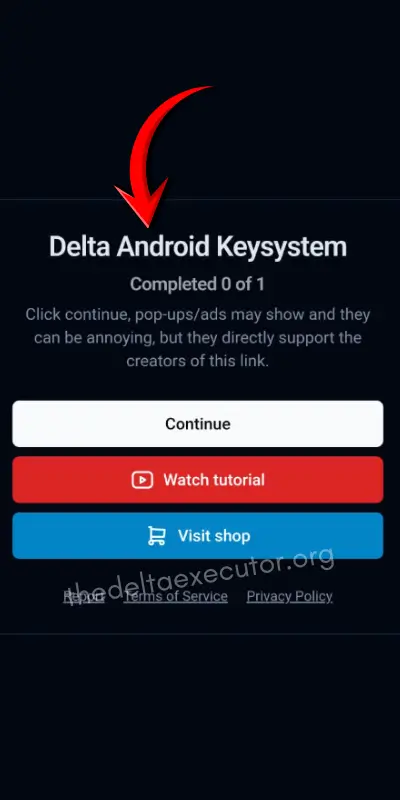
Step 5: Complete the Tasks
Press Continue and finish the tasks you see. Usually it’s simple actions like waiting a few seconds or opening a page. Do them one by one without spam-clicking or refreshing.
Step 6: Copy Your Key
When the tasks are done, Loot Link will show your key. Copy it exactly as it is. Don’t close the page until you’re sure you’ve copied it.
Step 7: Activate in Delta
Go back to Delta Executor, paste your key into the activation box, and confirm. Once it unlocks, you’re ready to load your scripts and play.
How Long Does the Key Last?
The Delta key usually lasts for a short session. Most of the time you’ll need to unlock a new key after a few hours or the next time you reopen the app. Delta does this to stop shared keys from floating around and to keep the system from getting abused by spam tools.
When the key expires, Delta will go back to locked mode. Scripts will stop executing, and the app will ask you to get a fresh key through Loot Link again. Nothing breaks or gets deleted, it just resets the verification process.
If you log in one day later or after a long play session, expect to repeat the steps. It is normal and happens to everyone using Delta. Once you claim a new key and paste it in, the executor unlocks and you are back to running scripts like usual.
Also Read > Get Delta Executor Android Key
Common Mistakes and How to Fix Them
Even if you follow the steps, things can still go wrong. Here are the most common problems and how to handle them.
1. Wrong Site or Fake Link
Always use the link that Delta gives you inside the app. It is the only verified path to Loot Link. Random websites can trap you in loops, show fake tasks, or even install malware. If the link did not come from Delta, do not trust it.
2. Network Errors
Slow or unstable internet can stop tasks from loading. Loot Link needs a steady connection to verify progress. Try switching from WiFi to mobile data or vice versa. Restarting your browser also helps.
3. Gateway Time-out
This is a common error many players see on Loot Link. It usually happens when tasks do not complete or the server is overloaded. Switching networks or using a different browser often fixes it. Waiting a few minutes and trying again also helps.
4. Old Delta Version
Outdated versions of Delta can break the key system. Always update to the latest version from a safe source before trying to claim a key. This prevents bugs and incomplete verification steps.
5. Tasks Not Loading
If tasks do not appear, avoid refreshing nonstop. Wait a few seconds or reload the page once. Opening the link in a different browser can also fix this. Completing the tasks slowly and in order is important.
6. Key Expired
Keys do not last forever. When a key expires, Delta will lock again. You must return to Loot Link and claim a new key. Paste the fresh key into Delta and the executor will unlock normally.
Should You Use Bypass Sites Like Lootlab or Work.ink?
Bypass sites often break when Delta updates. They can also have pop-ups or trackers that might harm your device. Using them can lead to failed keys or endless loops.
Sometimes these sites work if Delta hasn’t changed its system yet. A few players manage to skip tasks and get a key faster.
Most of the time, though, Delta updates break these sites. You could get stuck or waste time on a key that doesn’t work.
The safest way is to use the official Loot Link inside Delta. It works every time, keeps your device safe, and makes sure your scripts run correctly. Following the proper steps only takes a few minutes.
Conclusion
Getting your Delta Executor key might seem tricky at first, but it’s really straightforward if you follow the steps. Using Loot Link ensures your key is safe, unique, and works properly every time.
Avoid fake sites, unstable networks, and outdated versions of Delta to prevent errors like Gateway time-out or tasks not loading. Don’t rush through the process; completing the tasks carefully guarantees your executor will unlock without issues.
By sticking to the official method, you’ll always have a working key, Delta fully unlocked, and scripts ready to run. Once you get the hang of it, claiming your key takes just a few minutes, and you can get back to playing Roblox the way you want, without interruptions.
Frequently Asked Questions
Why do I see a Gateway time-out error?
This happens when Loot Link can’t complete tasks due to network or server issues. Switching networks or using mobile data usually fixes it.
Can I use bypass sites like Lootlab or Work.ink?
You can, but they are risky. They often break when Delta updates and may contain pop-ups or trackers. The safest approach is always using the official Loot Link.
What if the tasks don’t load or the key doesn’t work?
Check your internet connection, make sure Delta is updated, and complete all tasks carefully. If the key expires, simply get a fresh one from Loot Link.
Is it safe to use Delta Executor with Loot Link?
Yes. Following the official steps on thedeltaexecutor.org keeps your device safe, ensures your key works, and lets your scripts run smoothly without errors.
How do I get the key?
You get it through Loot Link. Open Delta, tap Get Key, complete the tasks on Loot Link, and copy the key back into Delta.

One Comment